


If you're still running your books from a mix of memory, bank statements, and a glovebox full of receipts, you're not choosing a bookkeeping system. You're gambling on your BAS, payroll, and cash flow.
I see this all the time with tradies and small business owners around Ashfield, Belrose, and the Northern Beaches. The work gets done. The invoices go out eventually. Then BAS time lands, super needs checking, and suddenly a Sunday afternoon disappears into chasing paperwork that should've been sorted weeks ago.
Generic software reviews don't help much. Most are written for US businesses, not Australian operators dealing with ATO reporting, STP Phase 2, BAS lodgements, super, and local bank feeds. If you want to compare bookkeeping software properly, you need to judge it on Australian compliance first and convenience second.
Why Your Bookkeeping Software Choice Matters More Than You Think
A lot of business owners start with the same system. A few invoices in one app. Expenses in another. Receipts in the ute. Payroll somewhere else. It feels manageable until the first messy quarter.
A plumber in Ashfield might finish jobs all week, send quotes from the phone, pay suppliers on the run, and assume the books can wait. Then BAS is due, two contractor payments haven't been coded properly, and payroll records don't match what was paid. At that point, bookkeeping software isn't an admin extra. It's the system holding the business together.
Bad software creates expensive admin
The wrong setup causes three immediate problems:
- Cash flow gets blurred: You can't see who owes you, what you've spent, or which jobs are profitable.
- Compliance slips: BAS, STP, and super reporting become a scramble instead of a routine.
- You waste owner time: You're doing detective work instead of running jobs, quoting work, or chasing payment.
This is exactly why I push business owners to get past spreadsheets and patchwork systems. If you're still relying on manual processes, have a look at these common bookkeeping mistakes small businesses make. Most are preventable with the right software and clean processes from the start.
Australian businesses have already moved
More than 70% of Australian SMBs have adopted accounting software, and that shift has cut tax compliance time by an average of 30% for small businesses, according to the Australian accounting software adoption data cited here. That lines up with what I see in practice. Owners who move to proper software stop wasting hours on avoidable cleanup.
Practical rule: If your software doesn't make BAS, payroll, and reconciliations easier, it's not helping. It's just a digital version of the shoebox.
There’s also a broader shift in how firms work with technology. If you're curious how modern tools support accounting and bookkeeping firms, it's worth looking at how automation is being used to reduce repetitive admin while keeping oversight where it belongs.
The point is simple. Good bookkeeping software gives you cleaner records, faster decisions, and fewer ATO surprises. Poor software gives you a prettier mess.
The Critical Criteria for Australian Businesses in 2026
Before you compare bookkeeping software brands, decide what matters. Most feature lists are padded with things that look impressive in a demo and barely matter in a real Australian small business.
For a tradie, consultant, retailer, or family business, I’d judge software on five issues. If it fails on the first two, stop there and move on.
| Criteria | What to check | Why it matters in Australia |
|---|---|---|
| ATO compliance | BAS, GST coding, STP Phase 2 support | This is the non-negotiable part |
| Payroll and super | Correct employee setup and reporting | Errors here create real headaches |
| Bank feeds | Reliable Australian bank connections | Faster reconciliation, fewer manual errors |
| Mobile usability | Quotes, invoices, receipt capture on site | Tradies don't work from a desk all day |
| Adviser access | Easy accountant or bookkeeper collaboration | Cleanup and reviews are much easier |
Start with STP and BAS
Most generic reviews often fall short. They talk about invoicing, dashboards, and integrations, but they barely touch local compliance.
Over 70% of Australian small businesses now require effective STP Phase 2 integration for real-time reporting, and software that focuses on US-style features instead of Australian compliance can lead to errors costing an average of $2,500 in penalties per incident, according to the ATO-related compliance figures cited here.
If you employ staff, run payroll, or lodge BAS, your software must handle Australian requirements properly. That includes understanding the ATO’s own rules around Single Touch Payroll and business activity statements.
If a platform is brilliant everywhere except Australian compliance, it's the wrong platform for an Australian business.
Mobile use matters more than marketing
Tradies don't sit in an office entering clean data all day. They quote on site, buy materials between jobs, and need to invoice fast while the work is still fresh.
A useful platform should let you:
- Send invoices quickly: The best time to invoice is when the job is done, not Friday night.
- Capture receipts immediately: If the docket stays in the ute, it usually gets lost.
- Check debtor balances on the phone: You need to know who still owes money before taking on more work for them.
Don't ignore payroll, bank feeds, and adviser access
Some businesses choose software because the subscription looks cheap. Then they discover payroll is clunky, the bank feed is unreliable, or the accountant can't easily review the file.
Check these before you commit:
- Payroll setup: Make sure employee categories, super, and leave can be handled properly.
- Australian bank feeds: Reconciliation should be routine, not a manual hunt.
- Accountant collaboration: Your adviser should be able to log in, review, adjust, and help without workarounds.
A flashy app won't save you if your GST coding is wrong. That's the lens I use when I compare bookkeeping software for clients. Compliance first. Workflow second. Nice extras last.
Head-to-Head The Big Three Compared
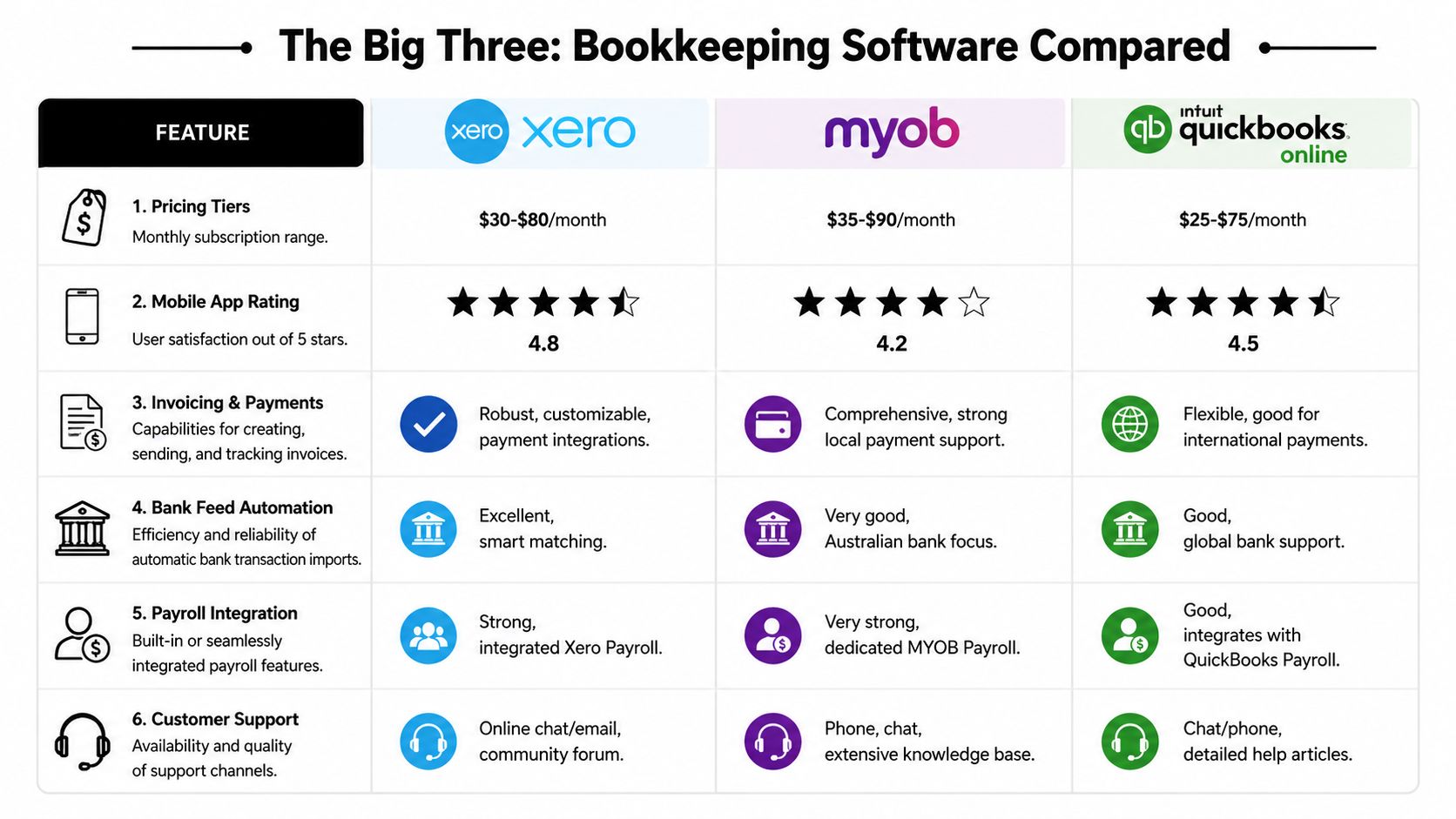
Most Australian small businesses end up choosing between Xero, MYOB, and QuickBooks Online. That makes sense. They’re the names that come up most often, and each can work in the right situation.
But they are not equal for Australian businesses. The differences matter, especially if your priority is ATO compliance, BAS workflows, payroll, and mobile use on the job.
Here’s the short version first.
| Software | Best fit | Main strength | Main drawback |
|---|---|---|---|
| Xero | Mobile-first tradies and service businesses | Strong cloud workflow and BAS handling | Less appealing if inventory is your core headache |
| MYOB | Businesses wanting established Australian payroll and local workflow familiarity | Strong local compliance focus | User experience can feel heavier |
| QuickBooks Online | Small businesses with stronger inventory needs | Useful stock features | Less convincing on Australian localisation |
Xero for most tradies and service businesses
If you're asking me for a direct recommendation for a typical tradie, consultant, or service-based small business, Xero is usually the first one I’d consider.
In the Australian market, Xero holds 52% market share among small businesses as of 2025, with MYOB at 28%. It also processed over 2.5 million BAS lodgements in FY2024 with an error rate under 2%, compared with 15% for manual methods, according to this Australian small business software comparison.
That matters because market share on its own doesn't impress me. What matters is why people use it. In Xero’s case, it's because the software is generally easier to work with day to day, especially for cloud-based bookkeeping.
Xero’s biggest strength: It suits owners who want to invoice, reconcile, and stay on top of BAS without turning bookkeeping into a second job.
For a builder in Belrose or an electrician in the Inner West, that often means cleaner bank reconciliation, quicker invoice creation, and fewer delays getting records ready for BAS review.
Its weak point is straightforward too.
Xero’s main weakness: If your business revolves around heavier stock control, Xero usually needs more support from add-ons than some owners expect.
That doesn't mean Xero can't work for stock-heavy businesses. It means I wouldn't pick it purely because everyone else uses it.
MYOB for businesses that want local depth
MYOB has been part of Australian business for a long time, and plenty of owners still prefer it. That preference isn't irrational. MYOB tends to appeal to businesses that want a more traditional accounting workflow and stronger familiarity with Australian compliance settings.
I often see MYOB suit businesses that already know the product, have payroll complexity, or want continuity rather than change. Some owners find its approach matches how they think about accounts.
Its strongest point is clear.
MYOB’s biggest strength: It has deep roots in the Australian market and often feels more compliance-oriented out of the box for owners who want a local-first system.
For an employer with regular payroll, long-standing admin staff, and established office processes, MYOB can be a very sensible choice. It can also work well where a business is less focused on slick mobile experience and more focused on keeping established back-office routines intact.
The downside is also easy to spot in practice. MYOB can feel less convenient for owners who want to handle everything quickly from a phone between jobs. If the person doing the books hates the interface, the software won't get used properly.
QuickBooks Online for selected use cases
QuickBooks Online gets attention because it's well known globally, but Australian businesses need to be careful not to confuse popularity elsewhere with local suitability.
I don't dismiss it. For some businesses, especially those with stronger inventory needs, it can make sense. But I’m less enthusiastic when compliance and local workflow are the deciding factors.
Its edge is this.
QuickBooks Online’s biggest strength: It can be a reasonable option if stock and inventory tracking sit near the centre of your operation.
That matters for certain wholesalers, retailers, and tradies carrying a meaningful amount of parts or serial-tracked items.
The problem is that Australia-specific needs still come first.
QuickBooks Online’s main weakness: It isn't the first platform I’d trust when ATO alignment, BAS flow, and STP confidence are your top priorities.
That’s the issue with many overseas reviews. They praise features that matter in another market and gloss over local compliance friction.
My direct recommendation
If you want the blunt version, here it is.
- Choose Xero if you're a tradie, consultant, or service business that wants simple cloud bookkeeping, strong everyday usability, and easier BAS preparation.
- Choose MYOB if your business is already comfortable with MYOB or you want a more established Australian accounting workflow, especially around payroll and office admin.
- Choose QuickBooks Online only if its inventory strengths clearly solve a real business problem that matters more than cleaner Australian compliance workflow.
If you're still weighing up options, this more detailed guide to small business accounting software in Australia can help narrow the field further.
The mistake I see most often
Owners often buy software based on what a mate uses, what’s on special, or what a generic review ranked first. That's lazy decision-making, and it creates expensive cleanup later.
A sole trader sparky doesn't need the same setup as a retailer with stock. A family company with payroll doesn't need the same platform as a solo consultant. The right answer depends on the business model, but for most Australian tradies and service businesses, Xero is the safest starting point.
Deep Dive Feature Analysis for Tradies
Software comparisons get vague very quickly. Tradies need something more practical than “good dashboard” or “powerful automation”.
The question is this. What happens on a Wednesday when you're on site, the supplier hands you a receipt, the client wants the invoice today, and you've still got payroll to think about before the week ends?
Mobile quoting and invoicing on the run
For tradies, the mobile app matters more than the desktop view. If it takes too many taps to issue an invoice, you’ll delay it. Delayed invoicing hurts cash flow.
Xero tends to suit this workflow well because it's built around cloud access and collaboration. Feature comparisons show Xero offers unlimited users and over 800 AU-specific integrations, saving users an average of 288 hours per tax season, according to this Australian feature comparison of bookkeeping software.
That means a business owner, office admin, and external adviser can all work in the same system without awkward handovers. In practice, that's useful when someone on site creates the invoice and someone in the office follows up payment.
Receipt capture and less paper chaos
Receipt capture is one of those features that sounds minor until you don't have it. Then BAS time becomes a scavenger hunt.
A practical setup should let you snap the docket when you buy materials and push it straight into the file. That’s not glamorous. It’s just effective.
For example:
- Fuel purchase between jobs: Snap it immediately so it doesn't disappear into the ute.
- Bunnings or supplier docket: Attach it to the expense while the detail is fresh.
- Subcontractor cost: Store the record where your bookkeeper or accountant can review it later.
If the software makes receipt handling clunky, people stop using it. Once that happens, the books become guesswork.
Clean books come from capturing transactions at the point of work, not from trying to remember them three weeks later.
Job tracking and stock handling
Not every tradie needs deep job costing. But plenty do need to know whether a job made money after labour, materials, and subcontractor costs.
Product differences start to matter more. Xero usually wins on ease of use and connected apps. QuickBooks Online often presents a stronger case where built-in inventory matters more. The same feature comparison notes that QuickBooks Online often provides stronger built-in inventory management with serial number tracking, which can matter for tradies managing significant stock.
So my practical view is simple:
| Need | Better fit |
|---|---|
| Fast invoicing, collaboration, clean cloud workflow | Xero |
| More stock-focused operation | QuickBooks Online |
| Traditional local accounting workflow | MYOB |
What actually matters on site
A plasterer, electrician, or plumber rarely chooses software because of reporting jargon. They choose it because they want fewer admin headaches.
The features that usually matter most are:
- Fast invoice creation after the job
- Easy receipt capture
- Clear bank reconciliation
- Simple visibility over who owes money
- Enough job or stock tracking for the way the business runs
If you're trying to compare bookkeeping software as a tradie, judge it by what happens in the ute, on site, and at 7 pm when you're trying to finish admin quickly. That's where the right system proves itself.
Painless Implementation and Migrating Your Data
Switching software feels bigger than it usually is. Most owners delay it because they assume the move will be messy, expensive, or risky.
It can be messy if you rush it. It’s usually quite manageable if you do it properly.

Start with cleanup before migration
Don't move junk into a new system. If your current file is full of uncoded transactions, duplicate contacts, and unreconciled accounts, that mess comes with you.
I’d usually tackle migration in this order:
- Review your current records: Make sure bank accounts, GST settings, payroll items, and debtor balances are sensible.
- Choose a clean start point: The start of a BAS period is often easier than a random date.
- Confirm opening balances carefully: Many migrations fail due to errors in this step.
If you're still using spreadsheets, this article on accounting with Excel explains why businesses eventually hit a wall and need a proper system.
Keep the process simple
A straightforward migration usually looks like this:
- Export core data from the old system.
- Import customers, suppliers, chart of accounts, and opening balances.
- Connect bank feeds.
- Test invoice creation, expense coding, and payroll setup.
- Reconcile the first period properly.
You don't need every historical detail rebuilt perfectly on day one. What you need is a clean current file that gives accurate reporting from the handover point forward.
The biggest migration mistake isn't switching software. It's switching software without checking the numbers that go in on day one.
When to get help
If your structure is simple, a basic migration may be manageable with guidance. If you've got payroll, multiple entities, historical GST issues, or messy opening balances, get help before you flip the switch.
The cost of a proper setup is usually far less than the cost of fixing a bad one later. That's especially true when BAS, payroll, and year-end accounts all depend on the same data.
When Software Is Not Enough Your EndureGo Tax Partnership
Bookkeeping software is a tool. It is not judgment. It doesn't tell you whether your setup is tax-effective, whether you've treated a transaction correctly, or whether you're heading into an ATO problem.
This matters most when the numbers stop being simple.
Where software stops helping
Software can record transactions. It can't give strategic advice on issues like:
- Business structure decisions: Sole trader, company, trust, or partnership
- Capital gains tax questions: Especially where property, investments, or mixed-use assets are involved
- ATO reviews, audits, and objections: Software stores data. It doesn't argue your case
- ASIC compliance: Company record-keeping and secretarial obligations still need oversight
- SMSF and more complex tax work: These need expertise, not just data entry
A platform might flag an issue. It won't explain the tax consequence properly or tell you the safest next move.
The better model
The most effective setup is simple. Let software handle the day-to-day processing. Let an accountant handle the review, strategy, and risk.
That’s where a service such as EndureGo Tax can fit alongside your software. The firm handles matters including BAS, company tax returns, trust and SMSF compliance, tax advisory work, and ASIC agent services for businesses that need more than transaction processing.
This is the part many owners miss. Good software reduces admin. It doesn't replace professional accountability when financial implications are substantial.
If the issue involves tax risk, structure, audit exposure, or legal compliance, don't rely on software prompts. Get advice from a human who understands the consequences.
My opinion on this
If you're a straightforward sole trader with clean books, software does a lot of heavy lifting. If you're running payroll, a company, a trust, investment activity, or anything unusual, software alone is not enough.
That's not a sales line. It's the practical limit of the tool.
Frequently Asked Questions
Can I lodge my own BAS using bookkeeping software
Sometimes, yes. But software only helps if the underlying coding is right.
If GST has been coded incorrectly, if personal spending has been mixed in, or if payroll figures are wrong, the BAS can still be wrong even when the software lodgement process looks neat. Plenty of owners can press the button. Far fewer can confidently say the data behind it is correct.
Is free bookkeeping software worth using in Australia
Usually not for a serious operating business.
Free tools can look attractive when you're starting out, but the trade-off is often weak Australian compliance support, limited payroll capability, poor collaboration, or awkward migration later. If you're employing staff, lodging BAS, or trying to stay organised for tax time, cheap usually becomes expensive.
Do sole traders really need bookkeeping software
In many cases, yes.
If you're issuing invoices, claiming expenses, dealing with GST, or trying to understand cash flow, proper software makes life easier. A sole trader can survive without it for a while, but once transactions build up, manual systems become unreliable very quickly.
Which software should a tradie choose
For most service-based tradies, I’d start with Xero.
It usually suits mobile invoicing, collaboration, and everyday bookkeeping better than the alternatives. If stock is a major part of your business, QuickBooks Online may deserve a closer look. If you're already comfortable with MYOB and your processes work, there may be no reason to force a move.
Should I switch software if my current system is annoying but still works
If “still works” means you're regularly behind on reconciliations, invoices are delayed, records are messy, or BAS preparation is painful, then yes, you should seriously consider switching.
The right time to move is before the next compliance problem, not after it.
What's the biggest mistake people make when they compare bookkeeping software
They compare features instead of workflows.
Owners get distracted by dashboards, reports, or international reviews. The better question is much simpler. Will this software help you invoice faster, capture expenses properly, reconcile cleanly, and stay compliant with Australian rules?
If the answer isn't clear, keep looking.
If you're deciding between Xero, MYOB, and QuickBooks and want an Australian answer instead of a generic software review, speak with EndureGo Tax. We work with small businesses, tradies, investors, and company structures across Ashfield and Belrose Northern Beaches, and we can help you choose the right setup, clean up your records, and keep your BAS, tax, and compliance obligations under control.
